AI · MCP
Use your own AI. We never meter it.
StoryOS ships a Model Context Protocol server. Point the Claude or ChatGPT you already pay for at your workspace and it works your real data — and your AI bill stays exactly where it is.
$0
what StoryOS charges when your agents run on your own Claude or ChatGPT — on every plan, including Free
2 min
to connect: paste one address, sign in with your StoryOS account, approve — no tokens, no config files
47
MCP tools — the agent gets the same surface you do, from queries to building whole databases and automations
Connect by signing in — no config
StoryOS is an OAuth connector: paste one address, sign in, approve. That's the whole setup.
In Claude
Open Connectors
In Claude (web or desktop): Settings → Connectors → Add custom connector.
Paste the address
https://mcp.storyos.dev/mcp — that’s the whole configuration.
Sign in and approve
Claude sends you through a normal StoryOS sign-in. Approve, and your workspace appears in Claude’s tools. No tokens, no JSON.
In ChatGPT
Turn on connectors
In ChatGPT: Settings → Connectors → Advanced → enable Developer mode (available on paid plans).
Add the server
Create a new connector with the address https://mcp.storyos.dev/mcp.
Sign in and approve
ChatGPT runs the same StoryOS sign-in. Approve, then enable the connector in a conversation to use your workspace.
Or let your assistant set itself up:
What gets copied
You are connecting to a StoryOS workspace over MCP.

1. Preferred (no tokens): add the remote MCP server
   https://mcp.storyos.dev/mcp as a connector. It supports OAuth - the user
   signs in with their StoryOS account and approves access. In Claude this is
   Settings -> Connectors -> Add custom connector; in ChatGPT it is
   Settings -> Connectors (developer mode) -> Add.
2. Advanced fallbacks, only if the client cannot do OAuth connectors:
   - Remote with a token: url https://mcp.storyos.dev/mcp with header
     "Authorization: Bearer <mn_pat_ token>" (created in the StoryOS app
     under Settings -> API tokens).
   - Self-hosted: command "node packages/mcp/dist/index.js" with env
     STORYOS_URL=<their instance URL> and STORYOS_TOKEN=<token>.
3. Once connected, call the get_started tool first - it explains the
   workspace/space/database model and the query filter format.
4. Use describe_database before reading or writing any database so you use
   real field api_names. Never guess field names or IDs.
Advanced: Claude Code, tokens & self-host
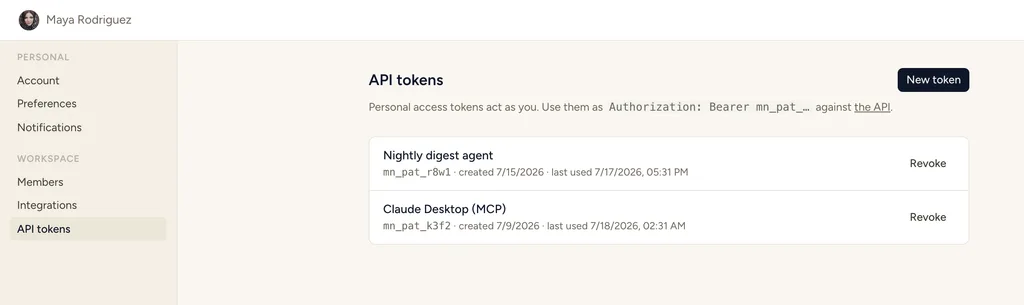
For clients that don't do OAuth connectors — or for scripts and self-hosted instances — create a personal access token at Settings → API tokens and configure the server directly. Tokens are scoped read / write / admin, and the agent is only offered the tools its token allows.
Hosted endpoint, token auth
{
  "mcpServers": {
    "storyos": {
      "type": "http",
      "url": "https://mcp.storyos.dev/mcp",
      "headers": {
        "Authorization": "Bearer mn_pat_…"
      }
    }
  }
}
Self-hosted, local stdio server
{
  "mcpServers": {
    "storyos": {
      "command": "node",
      "args": ["packages/mcp/dist/index.js"],
      "env": {
        "STORYOS_URL": "https://your-instance",
        "STORYOS_TOKEN": "mn_pat_…"
      }
    }
  }
}
Full walkthroughs in the MCP docs.
The toolset, documented
The agent gets the same surface you do — discover, read, write, and build.
Discover
The agent orients itself — no docs needed.
Read
Structured queries, not a made-up query language.
Monitor
Visibility into skills, runs and approvals — read-only by design, so the human stays the one who approves or reruns.
Write
Validated server-side — mistakes get named, not saved.
Automations
Your agent can build and edit automation rules, not just fill in the data they act on — admin-scoped tokens only.
Build
Agents can construct whole workspaces, not just fill them — admin-scoped tokens only.
Full reference in the MCP docs.
Why it doesn't hallucinate your data
The agent reads a described schema, filters with structured queries instead of a made-up query language, and every write is validated server-side — so mistakes get named, not silently saved. Your databases are the agent's long-term memory; there's no context stuffing to drift.
Your data, your AI, two minutes.
Start free — 30 days of Pro, no card. Connecting your own Claude or ChatGPT costs you nothing, ever.