Product
A real database that runs your business.
Not a notes app with tables bolted on. Structured records, true relations, computed fields, and automations — with an API and MCP over all of it.
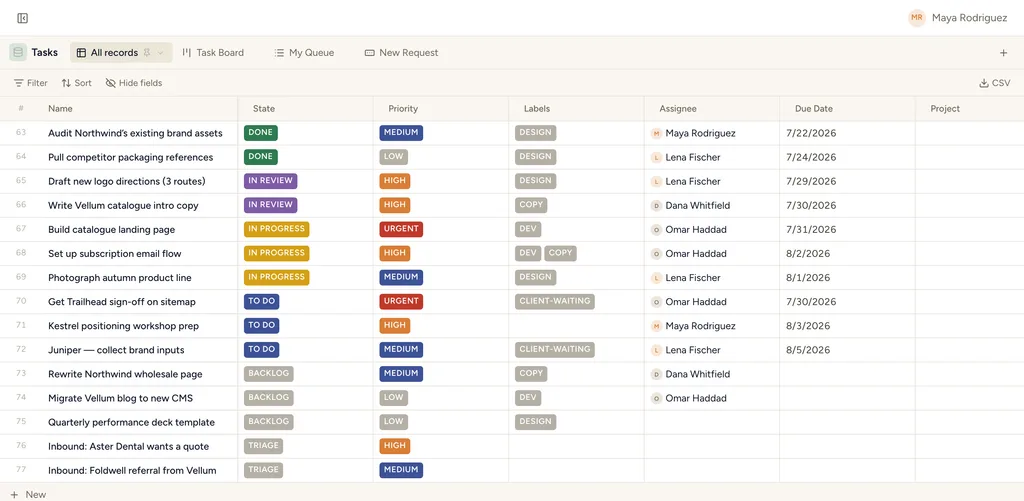
Everything a workspace needs
The primitives of a serious relational tool — on every plan.
Real relations
Link databases with true one-to-many and many-to-many relations — not lookups bolted on.
Rollups & lookups
Pull a related field through a relation, or aggregate a whole collection (sum, count, min, max, avg).
Formulas
Computed fields with a safe expression language and ~20 functions.
Automations & buttons
Rules that run on record events or a schedule; one-click buttons for manual actions.
Views, filters, colors
Saved views per database with filter ASTs, multi-sort, grouping, and color-by.
Docs, comments, files
Rich-text descriptions, @mentions, dedicated attachment fields — a cover, a video, a gallery, each addressable on its own instead of one undifferentiated pile — and standalone space documents.
Approval gates
Automations and agents stage anything risky — an outward email, a webhook, a Slack message, delegating to an agent — for you to approve or reject before it ever runs. The human stays the one who pulls the trigger on what matters.
Duplicate a database
Clone a database’s full schema — fields, colours, views, self-relations — into a new one in one click, or bring up to 50 records along. A relation to a different database can’t come along and is reported, never silently dropped.
A personal space, built in
Every member gets a private area for their own documents and views — only they can see it, and it can’t be shared, moved or deleted like a regular space. Nothing to set up.
Records open beside your work
Open a record from a table, board, search result or the command palette and it slides in beside what you were already looking at — never a full navigation away. Open a related record from inside it and it stacks.
Publish a view publicly
Turn a database view into a read-only link — no login required for whoever opens it. Pick exactly which fields show; rollups, lookups and formulas stay hidden unless you opt them in. Revoke it any time.
Copy records to another database
Select one or more records and copy them into a different database — fields auto-match by name and type, with a dry-run preview of what will be created before you confirm.
Dashboards across databases
Number tiles and charts on a grid — each block can name its own source database, so one dashboard can chart Tasks beside a tile counting Contacts. Lives on a database or, for a cross-database view, on the whole space.
Summary widgets on any view
A strip of stats, bars, lines or pies above a table, board, gallery or list — scoped to that view's own filter, drag-to-reorder. No new page to build or maintain: the numbers sit right above the records they describe.
A map of your relations
A dedicated page per database shows every database it connects to, in one glance — click through to any of them. Built for navigating and adding a relation, not editing one; cardinality changes still happen where they always did.
Undo a deletion
Deleted a database, view or space by mistake? Restore it from Trash — the same safety net records have always had, now covering the structure around them too.
A portal that looks like yours
Put your own logo and accent colour on every published view your clients open — on every plan, including Free. The StoryOS footer comes off on any paid plan.
Relations you can see and traverse
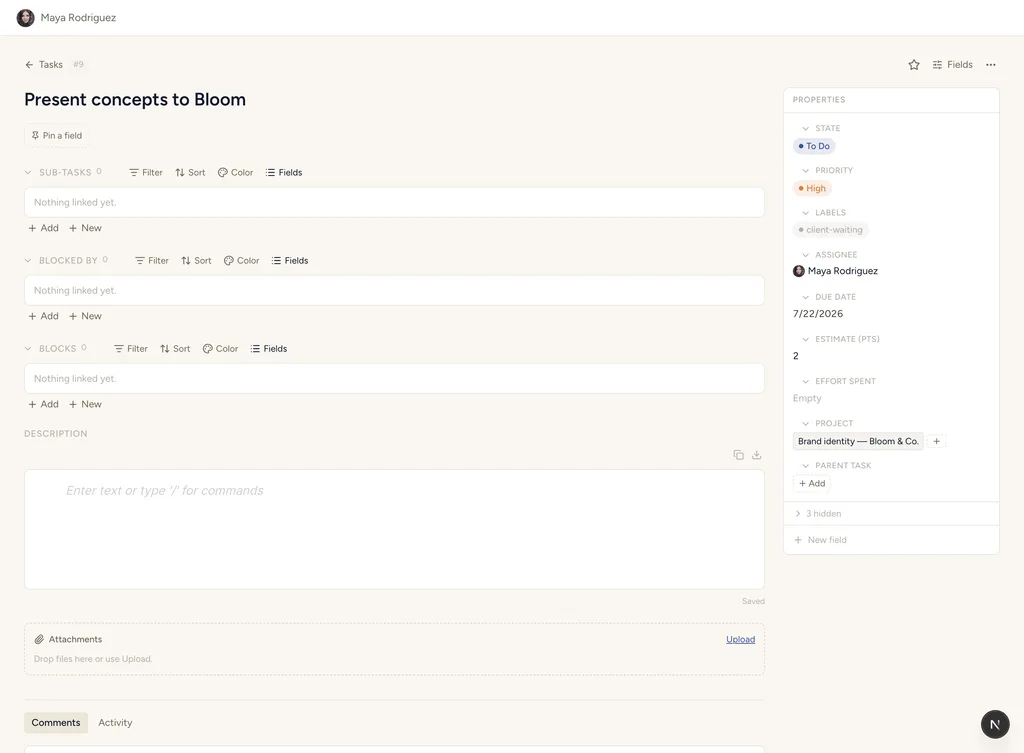
Open any record and its relations are right there — sub-tasks, blockers, the project it belongs to — as live sections, not lookup formulas. Link records from either side; rollups aggregate across the collection (sum, count, min, max, avg) and update as the data changes.
Automations watch for record events or run on a schedule, and buttons put one-click actions on the record itself — assign to me, advance the state, fire a webhook, wake an agent.
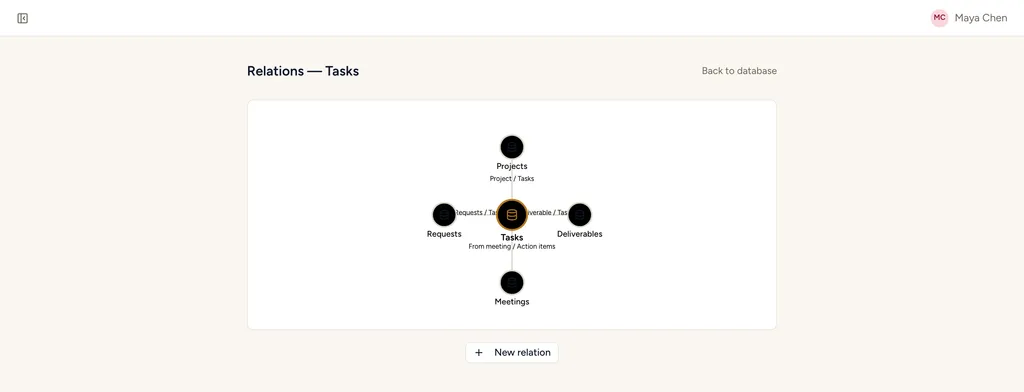
A map of your relations
Every database has its own Relations page — every database it connects to, in one glance, with the relation named on the line between them. Click through to any of them.
Built for navigating and adding a relation, not editing one — cardinality changes are the kind of structural change that still happens where it always did, on the field itself.
Share it, looking like yours.
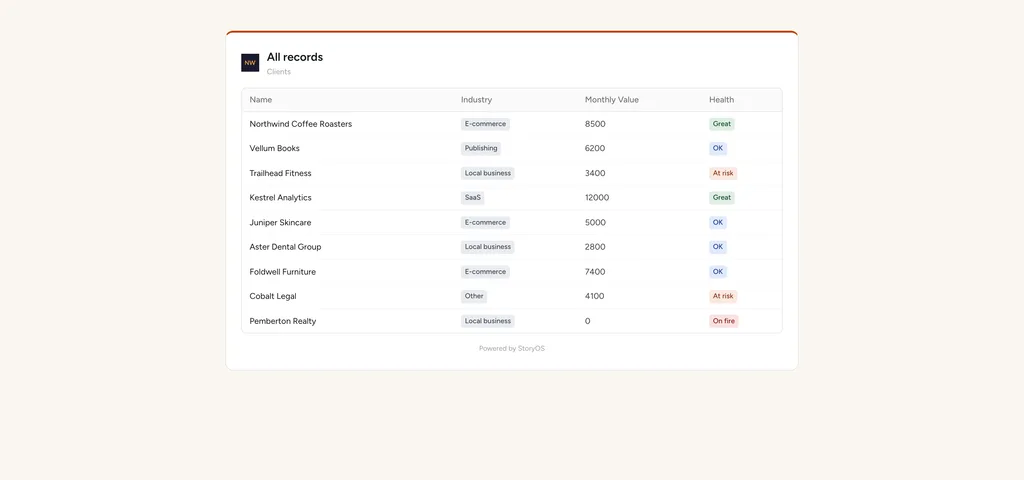
Publish any database view as a read-only link — pick which fields show, no login required for whoever opens it. Put your own logo and accent colour on it first, on every plan including Free.
The StoryOS footer comes off on any paid plan. Your logo and colour show regardless — an agency's client portal should look like the agency's, not ours.
No limits — and we mean records
Most tools cap the thing you can least control: how much data your business produces.
Records
Unlimited on every plan, including Free. Your CRM, order history, or content library never hits a cliff that forces an upgrade.
Features
Capability is never paywalled. Relations, rollups, formulas, automations, API, MCP — all of it on every plan. Paid plans buy scale, not features.
Your data
Full CSV import and export, a complete REST API, and an AGPL self-host option. There is no lock-in lever for us to pull — by design.
One dataset. Eight ways to see it.
Switch how you look at the same records — nothing is ever duplicated.
Table
The spreadsheet you know — typed fields, inline edit, filters, sorts.
Board
Kanban by any single-select. Drag cards between columns.
Calendar
Records on a month grid by a date field.
Gallery
A responsive grid of rich cards — great for anything visual.
List
Compact, groupable rows. Denser than a table, lighter than a board.
Feed
A scrollable stream of large cards — review notes and updates.
Timeline
Bars across a zoomable time axis — plan and schedule.
Form
Collect records through a form — intake, requests, applications.
The number, right above the records.
A stat, a bar, a line or a pie above a table, board, gallery or list — no dashboard to build for a number you check daily.
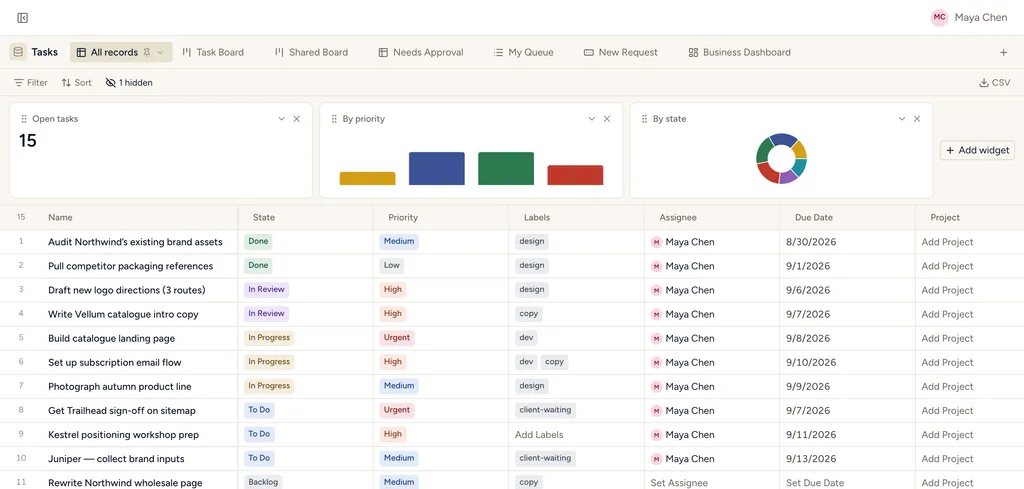
Scoped to the view's own filter — drag to reorder, remove any time.
Moving in is a day, not a quarter
CSV import
Import any spreadsheet or an export from your old tool — the wizard maps columns to any typed field your schema supports, including rich text, multi-select and workflow status, and creates records in bulk.
Linear import
Bring issues, projects, sprints and labels across with the built-in Linear importer.
API import
Script anything else over REST: create databases, fields and records programmatically — or let your AI assistant do it over MCP.
Sharing is workspace-first: invite members to build, and share spaces or databases with clients and stakeholders on tighter grants. Viewers & commenters are always free, on every plan.
API-first, all the way down
The UI is a client of the same public API you get. Every workspace, database, field, record and view is reachable over REST with a personal access token — and over MCP, so your AI assistant works the exact same surface you do.
# every urgent task, as JSON
curl "https://app.storyos.dev/api/v1/\
workspaces/$WS/databases/$DB/records" \
  -H "Authorization: Bearer mn_pat_…" \
  -G --data-urlencode 'filter={
    "and": [
      { "field": "priority", "op": "eq",
        "value": "Urgent" }
    ]
  }'
Model your business in an afternoon.
Start free — 30 days of Pro, no card. Unlimited records from day one.