Integrations
Connect the tools you already use.
Import from your existing tools, post updates out to them, and pull scheduled data in — all landing as real, linked records in your workspace, not a separate silo.
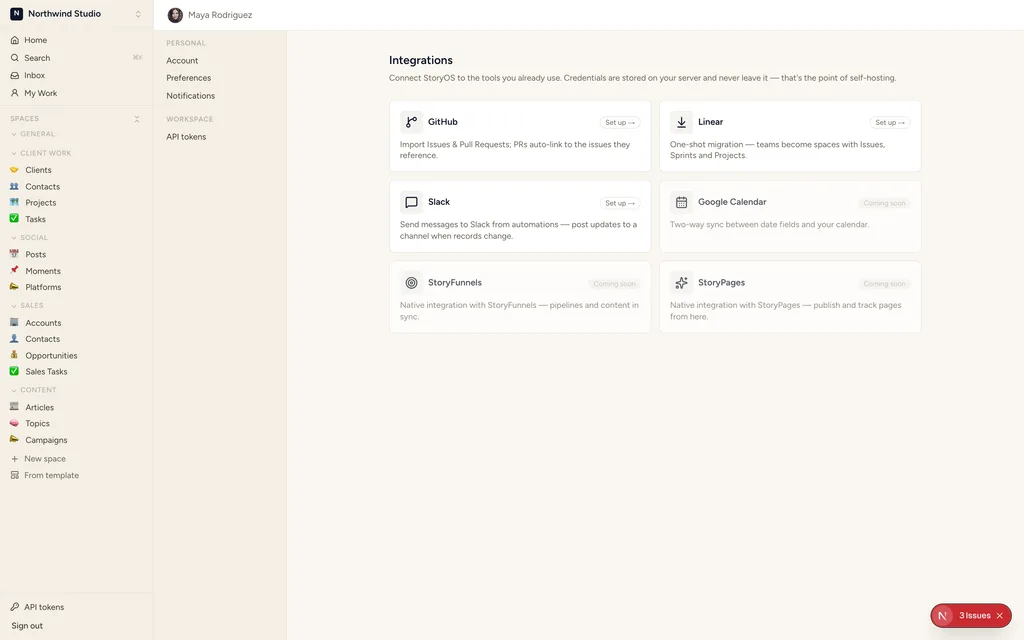
Settings → Integrations: what's connected, what's available, and what your admin has already set up.
Bring your work in
Import from the tools you're leaving, and sync with the ones you're keeping.
GitHub
Import Issues and PRs into a database, with auto-linking back to the source repo. One-click OAuth connect.
Linear
A one-shot migration: bring your Issues, Sprints and Projects across as real, linked StoryOS databases.
Slack
Automations post messages to a channel — status roll-ups, approval notifications, anything a rule can trigger.
YouTube
Import a channel’s videos, and pull comments and metrics on a schedule (see Sources below). One-click OAuth connect.
Google Calendar
Two-way sync between a date field and your calendar — reschedule in either place, both stay in sync.
MCP (Claude / ChatGPT)
The native connector: sign in, approve, and your own Claude or ChatGPT reads and writes the workspace — zero markup, never metered.
Delegate to agent
No credential to connect — assign work to a StoryOS agent instead of a third-party tool.
Connections
Credentials your automations and sources can reuse, once connected.
Shopify
Admin API access token — powers the Shopify sources below (products, variants, collections).
Apify
API key — run any Apify actor as a scheduled or on-demand automation action or source.
Resend / SMTP
Email sending for automations — managed Resend, or bring your own SMTP.
HTTP (custom API)
A generic bearer/basic/header-auth connection for any API an automation or source needs to call.
Sources
Scheduled ingestion — external data lands as records you can filter, sort and automate on, just like anything else in the workspace.
YouTube
Videos, comments and metrics ingested into a database on a schedule — pairs with the YouTube Videos/Comments/Metrics templates.
Shopify
Products, variants and collections, kept in sync as real records.
Apify actor
Run any actor from the Apify store and land its output as records.
Social engagement (Meta, LinkedIn, X)
Comments and mentions land as records, on a schedule — today this rides the generic HTTP connection, so you paste your own bearer token; there is no one-click “Connect with Meta/LinkedIn/X” yet.
Every one of these works the same on self-hosted StoryOS as on the hosted version — nothing here is Cloud-exclusive today. Self-hosting a Tier-B provider (YouTube, Google Calendar) just means registering your own Google OAuth app once; until then the gallery shows “configured by your admin,” never a broken button. Full self-hosting details on GitHub →