Connect Claude (or ChatGPT) to your real data with MCP
The Model Context Protocol lets an assistant work your actual workspace — not a copy pasted into a prompt. Here's how StoryOS uses it, and why it grounds the agent instead of letting it hallucinate.

Ievgen Krasovytskyi
Founder, StoryOS ·
There are two ways to get an AI assistant to help with your business data. The common one is to copy the data into the chat: paste the spreadsheet, dump the thread, describe your setup in prose, and let the model reason over the snapshot. It works until it doesn’t — the snapshot goes stale the moment you paste it, the model invents details to fill gaps, and nothing it does actually changes anything.
The other way is to give the assistant a live connection to the real workspace, with tools to read and write it directly. That’s what the Model Context Protocol is for, and it’s how StoryOS connects to Claude and ChatGPT.
What MCP actually is
MCP is an open standard for exposing tools and data to an AI assistant in a way the assistant can discover and call. Instead of you describing your data in a prompt, the assistant asks the server what’s available and calls typed tools to work with it. The server is the source of truth; the model is the reasoning layer on top. StoryOS ships an MCP server as part of the product — not a bolt-on, the same core the app uses.
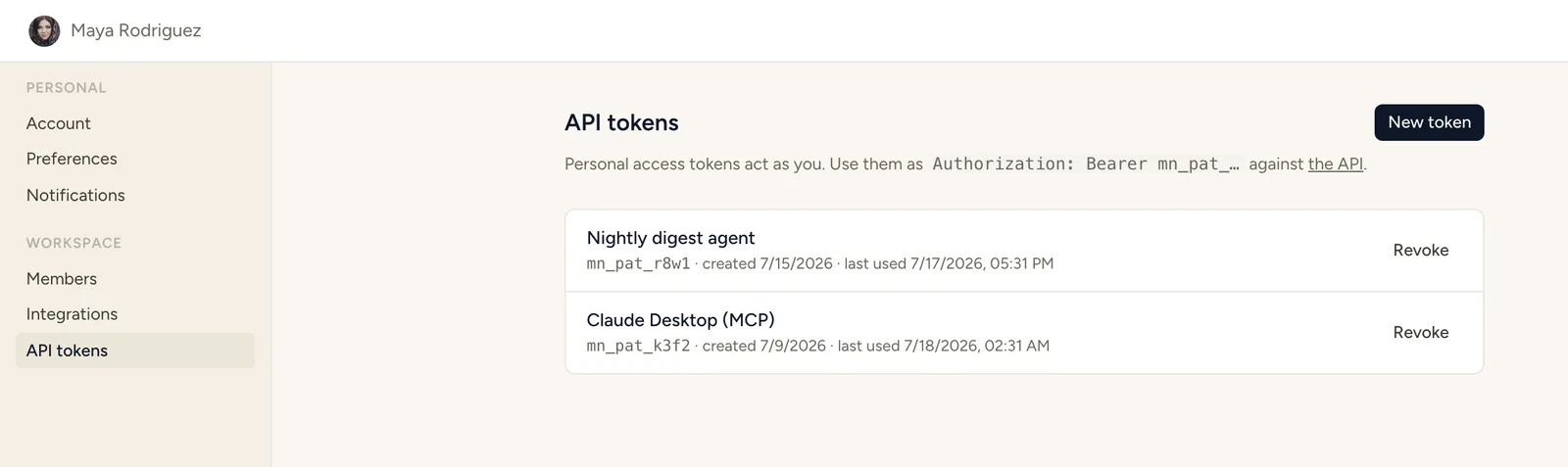 The whole setup: one personal access token from Settings → API tokens.
There are two ways to connect it, depending on where your workspace lives:
- Local (stdio). If you’re self-hosting or running against your own instance, the MCP server runs as a local process. You drop a personal access token into your assistant’s config and it launches the server over stdio. Everything stays on your machine and your box.
- Hosted (OAuth). For managed cloud, we expose a hosted MCP endpoint you authorize with OAuth — no token juggling, no local process. You approve the connection once and your assistant can reach your workspace from anywhere.
Same tools either way. The transport changes; the surface doesn’t.
The tools, and why they’re small on purpose
A good tool surface is narrow. The StoryOS MCP server exposes the operations that matter and nothing that invites trouble: list workspaces and databases, describe a database’s schema, query and search records, get a single record, create and update and delete, link records across relations, add a comment, run a button. About a dozen tools that map cleanly onto how the product actually works.
Update, 2026-09-02: the surface has grown a lot since this was written — the server now exposes 140 tools, adding schema-building (create databases, fields, relations), automation-rule management, and per-area coverage well beyond the CRUD set above. The principle hasn’t changed: every tool is still narrow and typed, and every write is still validated server-side. Breadth grew; the guardrails didn’t loosen.
Update, 2026-09-08: up to 161 tools now — the newest additions let an agent propose and build a whole schema, or install a Business Pack, in one call instead of one round trip per field.
We resisted the urge to expose a raw query escape hatch, and that restraint is the point. The moment you hand an agent a free-form query language, you’ve handed it a thousand ways to be confidently wrong. A small, typed toolset is one the model can use correctly on the first try.
Why it doesn’t hallucinate your fields
“Grounded” gets thrown around loosely, so here’s the mechanical version — the three specific things that stop the agent from making your data up.
It reads the schema before it acts. The agent calls describe_database and gets the real fields, their types, and the allowed options for select fields. It isn’t guessing that your status field is called status and has a value called Done. It asked, and the workspace told it stage with an option called Shipped. You can’t hallucinate a field you just looked up.
It filters with structure, not strings. Queries go through structured conditions — this field, this operator, this value — not a query language the model composes character by character. There’s no SQL to get subtly wrong, no fuzzy syntax to misremember. The filter is data, and data is hard to hallucinate into a security bug.
Every write is validated server-side. This is the safety net under the whole thing. When the agent creates or updates a record, the server checks it against the real schema. Set a select field to a value that doesn’t exist and the write is rejected, with a named error the agent can read and correct — not silently coerced, not quietly saved as junk. Bad moves fail loudly at the boundary instead of rotting in your database.
Put together: the agent works from a schema it read, filters with structure it can’t fumble, and writes through a gate that catches its mistakes. That’s what makes it safe to point an assistant at your production workspace instead of a throwaway copy.
What this unlocks
Once the assistant is connected, the interaction changes character. You stop pasting and start delegating.
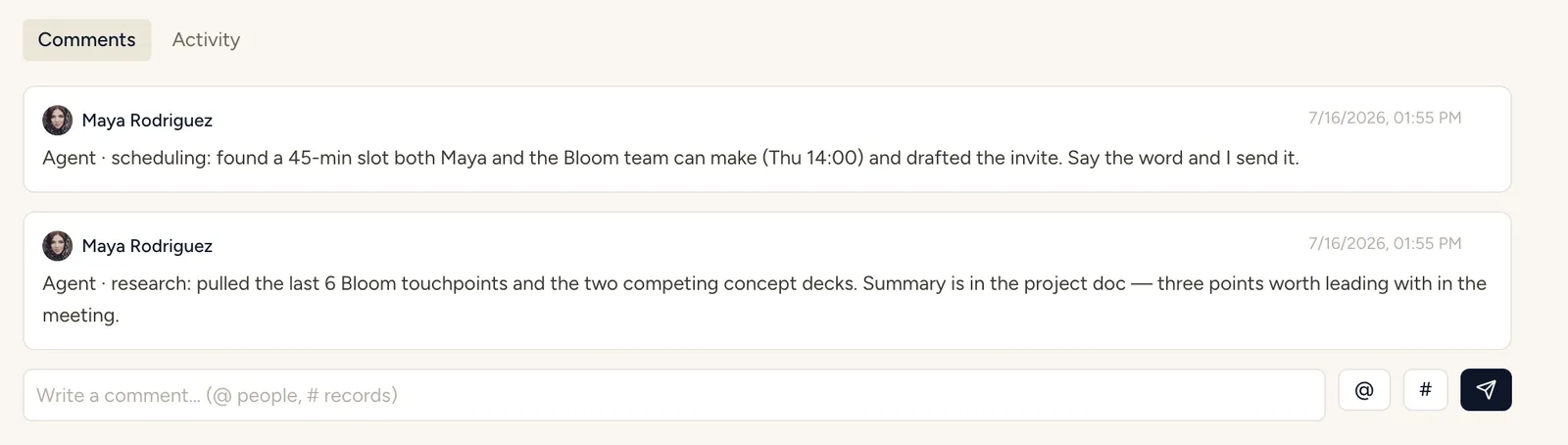 A real run: the agent researched, proposed a meeting slot, and reported on the record.
- “Which Acme deliverables are at risk, and who owns them?” — it queries the real records and answers from today’s data, not a stale paste.
- “Create next week’s content briefs from the approved ideas and link each to its topic cluster.” — it reads the ideas database, creates the briefs, and wires the relations.
- “Move every lead that went cold this month to the nurture stage and draft a re-engagement note on each.” — it filters, updates, and drafts, and you approve the batch.
None of these are chat transcripts you copy back into a tool by hand. They’re changes to the actual workspace, made through a connection that’s grounded in your schema and guarded on every write.
That’s the difference between an assistant that talks about your business and one that helps run it. MCP is the wire, the strict tool surface is the safety, and your workspace is the thing that finally gets the work done.
Run your business on StoryOS.
Open source, self-hostable, agent-native. Free plan, 30-day Pro trial, no card — and your own AI is never metered.