Templates · Marketing
Video Production
From idea to published: scripts, shoots, edits and costs in one pipeline.
A video is a dozen dependent steps — script, shoot, edit, thumbnail, publish — and the one that slipped is invisible until the publish date arrives.
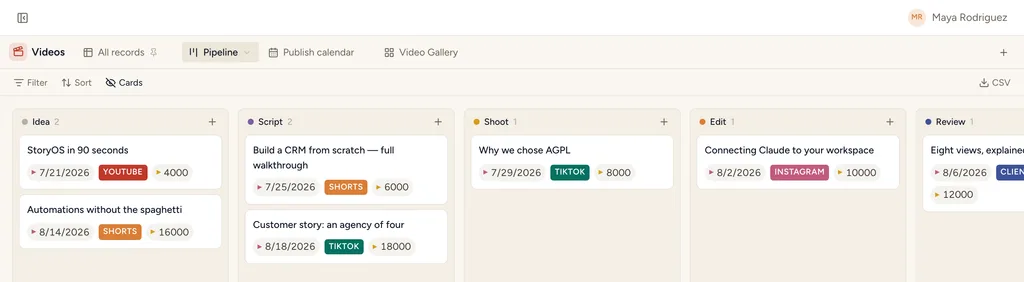
Video Production, installed — the Pipeline view with sample records already in it.
What gets installed
3 connected databases, with fields, relations and views pre-wired.
Videos
Production Tasks
Expenses
Ships with 5 saved views: Pipeline (board) · Publish calendar (calendar) · Video Gallery (gallery) · This week (table) · All costs (table)
How this template works
How this works
Videos move through a stage pipeline (Idea → Script → Shoot → Edit → Review → Published); the script lives ON the video as rich text. Production Tasks carry the legwork; Expenses track gear, locations, talent.
The loop
- New concept → create a Video at Idea; write the Brief.
- Script stage: draft in the Script section — comments happen right there.
- Shoot/Edit: tasks per shoot day; the Publish calendar holds the schedule.
- Published: fill the URL; the pipeline board tells the whole story at standup.
Tips
- If you also run the Client Work pack, videos auto-link to Clients (the installer wires the relation when the Clients database exists).
- Track per-platform cuts as separate Videos linked to the same tasks — cheaper than modeling "deliverables".
Then put an agent on it
An agent watches the pipeline and flags any video whose publish date is closer than its remaining steps allow, with the blocking task named.
It runs on your own Claude or ChatGPT over MCP — never metered, never marked up — and every move it makes waits at an approval gate. How agent runs work →
More marketing templates
Calendar
A ready-to-sync event calendar with dates, notes, status and location.
YouTube videos
A source-ready catalog for videos from a connected YouTube channel.
YouTube comments
A source-ready inbox for channel comments and replies.
See the bigger picture: how marketing teams run on StoryOS →
Install Video Production in one click.
Start free — 30 days of Pro, no card. Unlimited records, and your own AI is never metered.
Template contents synced from the product registry, 2026-07-26.