Templates · Agency
Client Space
A per-client space you share with the client — tasks, deliverables, meetings, requests.
The client asks for status on Slack, approvals happen in email, and neither of you can say what was agreed three weeks ago.
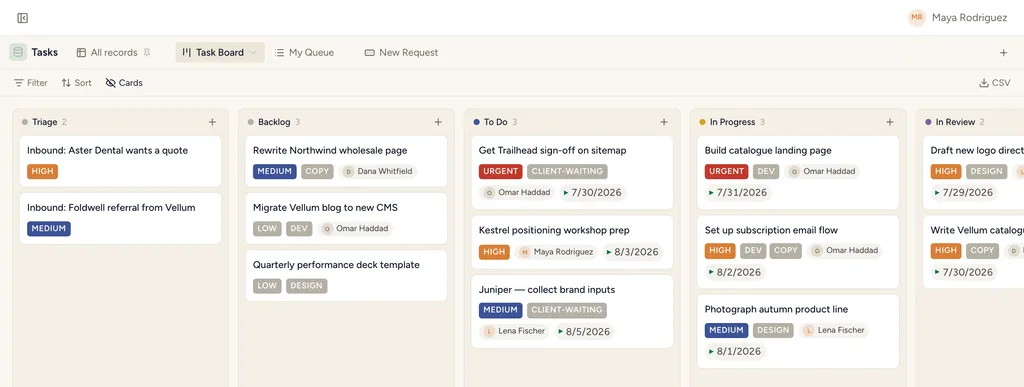
A real board view in StoryOS — the shape Client Space installs.
What gets installed
4 connected databases, with fields, relations and views pre-wired.
Tasks
Deliverables
Meetings
Requests
Ships with 7 saved views: Shared Board (board) · Waiting on Client (table) · Needs Approval (table) · Delivery Board (board) · Upcoming (table) · Meeting Calendar (calendar) · Request Board (board)
How this template works
How this works
This is the space you SHARE with a client (invite them as a guest with editor access — they work, they just can't touch structure). Tasks with a Client Approval state, Deliverables, Meetings and Requests for their asks.
The loop
- Client requests come into Requests; you convert accepted ones into Tasks.
- Deliverables move to Client Approval; the client flips them from their side.
- Meeting notes live in Meetings — shared memory beats email threads.
Then put an agent on it
An agent drafts the "ready for your review" note when a deliverable moves to review, so the client hears from you before they have to ask.
It runs on your own Claude or ChatGPT over MCP — never metered, never marked up — and every move it makes waits at an approval gate. How agent runs work →
More agency templates
Client Projects & Tasks
Clients, contacts, projects, tasks and invoices — the whole agency backbone, interlinked.
Agency CRM
Lead pipeline with proposals — the board where the money happens.
Content Pipeline
Ideas rated, articles through an editorial board, organized by topic clusters.
See the bigger picture: how agencies run on StoryOS →
Install Client Space in one click.
Start free — 30 days of Pro, no card. Unlimited records, and your own AI is never metered.
Template contents synced from the product registry, 2026-07-26.