Templates · Agency
Client Projects & Tasks
Clients, contacts, projects, tasks and invoices — the whole agency backbone, interlinked.
Every client asks "where are we?" at the same time, and answering means checking three tools and a Slack thread per project.
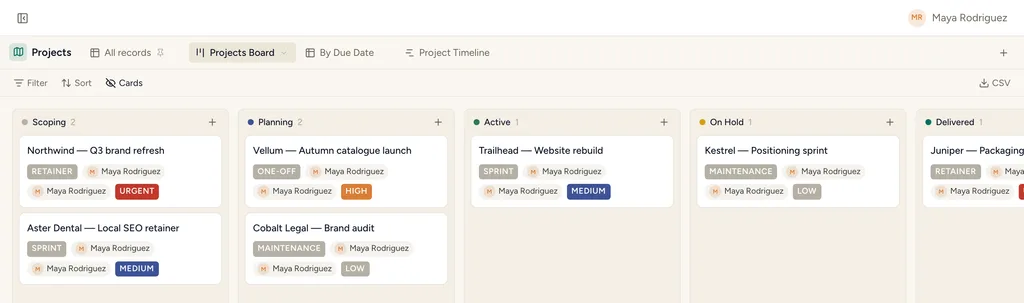
Client Projects & Tasks, installed — the Active Clients view with sample records already in it.
What gets installed
5 connected databases, with fields, relations and views pre-wired.
Clients
Contacts
Projects
Tasks
Invoices
Ships with 15 saved views: Active Clients (table) · Health Board (board) · Client Directory (gallery) · All Contacts (list) · Projects Board (board) · By Due Date (table) · Project Timeline (timeline) · Task Board (board)
How this template works
How this works
Clients anchor everything; Projects belong to a client; Tasks carry the daily work with the full Linear-style DNA (states, priorities, labels, sub-tasks, blockers). Contacts keep the humans attached to their companies, and Invoices close the loop — billed against both a Client and the Project that earned it.
The loop
- New engagement: Client → Project → break into Tasks on the Task Board.
- Daily: everyone lives in My Tasks; the Triage view catches unsorted intake.
- Client health: update the Health field on Clients weekly — the Health board is the account review.
- Billing: raise an Invoice against the Project when work ships; Unpaid & Overdue and the Payment Calendar are the finance review.
Tips
- The Client Directory gallery and Project Timeline are the client-facing view of the same data — good for a status call.
Then put an agent on it
A scheduled agent rolls up each client’s open tasks and slipping due dates, then drafts the weekly update on the client record for you to send.
It runs on your own Claude or ChatGPT over MCP — never metered, never marked up — and every move it makes waits at an approval gate. How agent runs work →
More agency templates
Client Space
A per-client space you share with the client — tasks, deliverables, meetings, requests.
Agency CRM
Lead pipeline with proposals — the board where the money happens.
Content Pipeline
Ideas rated, articles through an editorial board, organized by topic clusters.
See the bigger picture: how agencies run on StoryOS →
Install Client Projects & Tasks in one click.
Start free — 30 days of Pro, no card. Unlimited records, and your own AI is never metered.
Template contents synced from the product registry, 2026-07-26.