Templates · Agency
Content Pipeline
Ideas rated, articles through an editorial board, organized by topic clusters.
Ideas rot in a doc, drafts scatter across Drive, and nobody can say which articles are actually moving this week without opening six tabs.
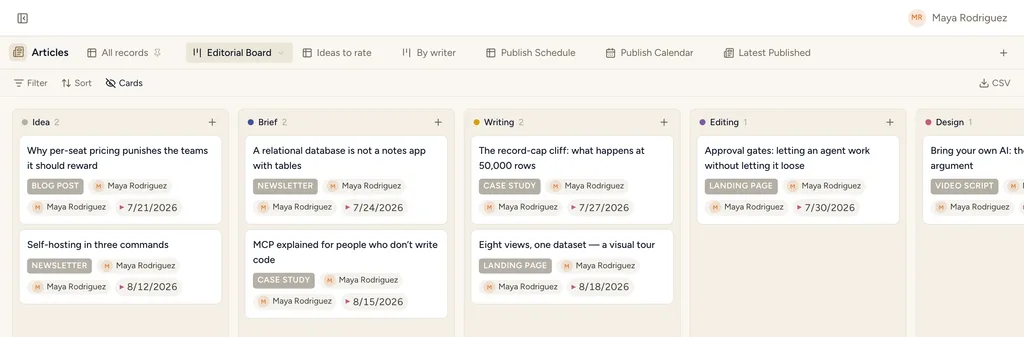
Content Pipeline, installed — the Editorial Board view with sample records already in it.
What gets installed
3 connected databases, with fields, relations and views pre-wired.
Articles
Topics
Campaigns
Ships with 9 saved views: Editorial Board (board) · Ideas to rate (table) · By writer (board) · Publish Schedule (table) · Publish Calendar (calendar) · Latest Published (feed) · Topic map (board) · Campaign Board (board)
How this template works
How this works
Articles flow Idea → Brief → Writing → Editing → Design → Ready → Published on the Editorial Board. Topics are your SEO clusters — articles link to them many-to-many. Campaigns group content pushes.
The loop
- Capture every idea as an Article at Idea stage; score it with Idea Rating (1-5) — review the Ideas to rate view weekly and promote the winners to Brief.
- Draft in the rich-text Draft section right on the article; editors comment there.
- Watch the By writer board for overload before assigning.
- On publish: fill URL + Published Date; the article stays as the permanent content record.
Tips
- Topics with Now priority and no linked articles = your gap list.
- Word count + primary keyword make the SEO retro possible later.
Then put an agent on it
When an article enters Brief, an agent can research the keyword, draft the outline onto the record, and leave the stage change for you to approve.
It runs on your own Claude or ChatGPT over MCP — never metered, never marked up — and every move it makes waits at an approval gate. How agent runs work →
More agency templates
Client Projects & Tasks
Clients, contacts, projects, tasks and invoices — the whole agency backbone, interlinked.
Client Space
A per-client space you share with the client — tasks, deliverables, meetings, requests.
Agency CRM
Lead pipeline with proposals — the board where the money happens.
See the bigger picture: how agencies run on StoryOS →
Install Content Pipeline in one click.
Start free — 30 days of Pro, no card. Unlimited records, and your own AI is never metered.
Template contents synced from the product registry, 2026-07-26.