Templates · Agency
Social Media Calendar
Plan posts around calendar moments, across platforms, with an approval flow.
Posts get planned in a spreadsheet, written in DMs and approved by nobody — then the calendar moment passes and the post ships late or not at all.
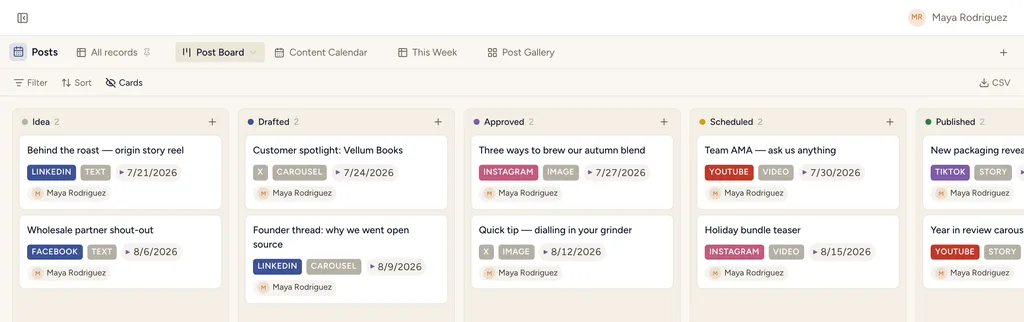
Social Media Calendar, installed — the Post Board view with sample records already in it.
What gets installed
3 connected databases, with fields, relations and views pre-wired.
Posts
Moments
Platforms
Ships with 5 saved views: Post Board (board) · Content Calendar (calendar) · This Week (table) · Post Gallery (gallery) · Moments calendar (calendar)
How this template works
How this works
Posts carry the content and the approval flow; Moments are the dates that matter (launches, holidays, awareness days) that posts hang on; Platforms hold each channel's specs and links (image sizes, character limits) so nobody googles them twice.
The loop
- Quarterly: fill Moments first — they are the skeleton of the calendar.
- Weekly: create Posts against the next two weeks of Moments; move them Idea → Drafted → Approved → Scheduled → Published on the board.
- The Content Calendar view (by publish date) is the source of truth for what goes out when.
Tips
- The Channel multi-select is for quick filtering; the Platforms relation is for specs — use both.
- Posts link to Articles when the Content Pipeline pack is installed (auto-wired cross-pack).
Then put an agent on it
An agent drafts variants per platform from the approved concept and parks them on the calendar date, waiting on your sign-off before anything publishes.
It runs on your own Claude or ChatGPT over MCP — never metered, never marked up — and every move it makes waits at an approval gate. How agent runs work →
More agency templates
Client Projects & Tasks
Clients, contacts, projects, tasks and invoices — the whole agency backbone, interlinked.
Client Space
A per-client space you share with the client — tasks, deliverables, meetings, requests.
Agency CRM
Lead pipeline with proposals — the board where the money happens.
See the bigger picture: how agencies run on StoryOS →
Install Social Media Calendar in one click.
Start free — 30 days of Pro, no card. Unlimited records, and your own AI is never metered.
Template contents synced from the product registry, 2026-07-26.