The board was never the work
For years, running a small business with software meant keeping a second business on the side: the board. You did the work, then you went and told the board about it. A card said “Send invoice”, but it didn’t know which customer, which job, or whether the invoice had already gone. The board drifted away from the business, and the person keeping the two in step was you, usually late in the evening.
Then the assistants arrived, brilliant and forgetful. Claude or ChatGPT could write the email to your client in seconds, once you had pasted in who the client was, what you had promised and what the last email said. Every conversation started from zero. The AI did the typing. You were still the memory, the queue and the safety net.
We think that is backwards, and we built StoryOS to turn it the right way round.
Work happens on real things
A business is a story told in real things. A customer has jobs. A job has tasks, a quote, and an invoice that is paid or isn’t. In StoryOS those are records, and they link up the way they do in life. When an assistant works here, it reads that story first: it looks at how your workspace is built before it writes, so it knows what an invoice is in your business instead of guessing at a field name.
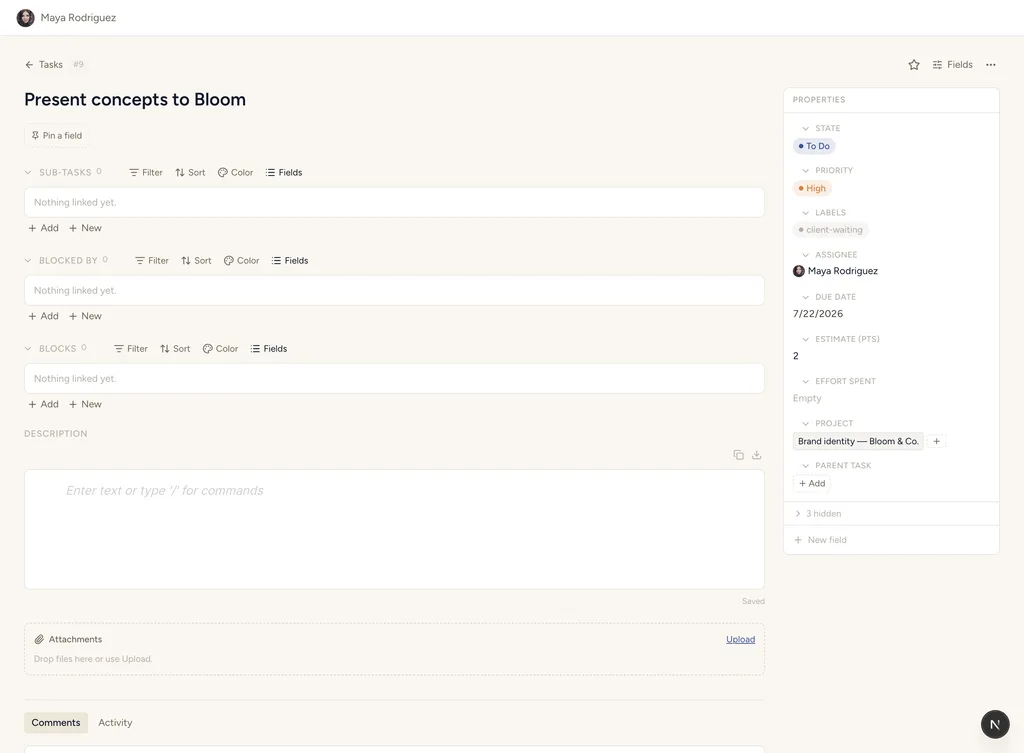
That changes what you can ask for. Not “write an email to a client”, but “draft an update for the bakery about their website job”. The draft lands on the job, next to the tasks it is about, with a comment saying what changed and why.
Agents are hired, like colleagues
We don’t think of agents as a feature you switch on. We think of them as colleagues you hire into the business. A colleague has a job, a queue of work, a place to keep notes, and someone who signs off on the things that matter. So does an agent in StoryOS.
It works from the same tasks your team does. Hired agents are early access and run on your own computer; today, the way to get work done is to ask your AI, and every draft waits for your yes. Ask your AI to draft a welcome packet and a first-week checklist for a new client: the Agency OS template includes an Onboarding Assistant for this (early access). Its memory is the business itself, the records, the links, the comments and the files, so nobody has to explain the client to it again tomorrow.
And like any new hire, it starts with less trust than it will end with. The agents that come with a template install switched off. You read what each one does, and you turn it on when you are ready.
You stay in charge
This is the part we care about most. Handing work to a crew is only restful if you know what it cannot do without you.
In StoryOS you gate the moves that matter: an email to a customer, deleting records, one particular agent’s writes. When an agent tries one of those, it doesn’t happen. It waits in your Inbox, and nothing goes until a person says yes. Approving applies exactly what was staged, nothing added afterwards. The AI cannot approve itself or change the gates. That is a rule in the platform, not a line in a prompt that a clever model can talk its way round.
We try to be exact about how big that promise is. Not every outward action is held (an email to someone inside your own workspace, for one, is not), so we show you which ones are, and where.
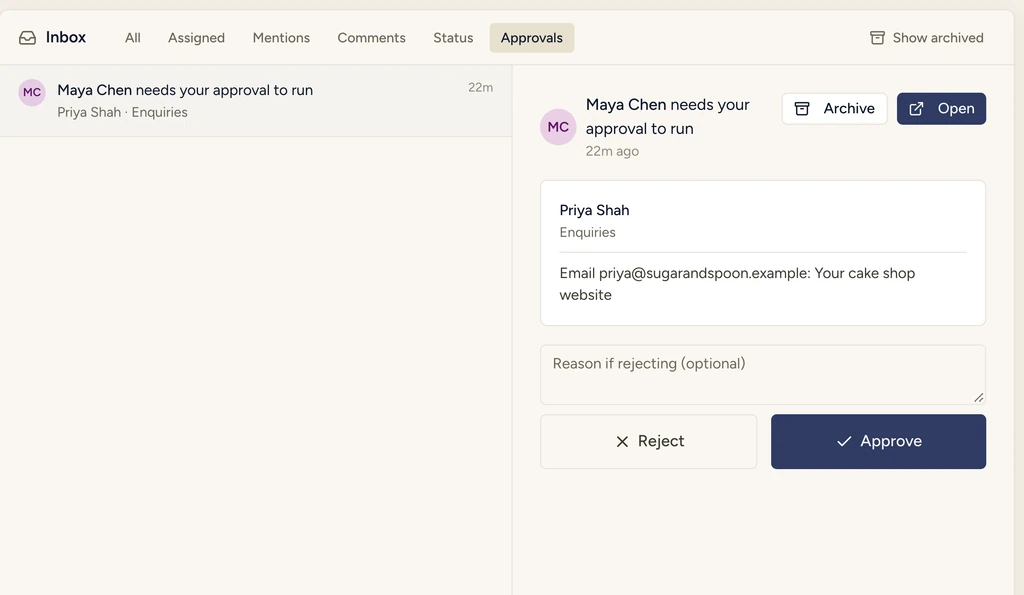
Everything an agent changes carries an agent badge, under the name of the person it works for. At the end of the day you can see what the crew did, what it is waiting on you for, and what it got wrong. And when it does get something wrong, a field that doesn’t exist or a value that doesn’t fit, the write is refused with an error that names the problem, and nothing is saved.
Your AI, your bill
A crew shouldn’t come with a meter running. You connect the Claude or ChatGPT you already pay for, and we never meter it or mark it up. The agents you hire through the Runner, in early access now, run on your own computer inside your own Claude Code subscription. The honest trade-off: that computer has to be on and signed in. If it sleeps, the agents wait.
What it looks like on a Tuesday
You open the laptop and ask what is waiting. Two tasks are overdue, one approval is sitting in the Inbox, and a client has no next step. You read the follow-up drafted for the proposal that moved to Negotiating, change one line, and let it go. You ask for this morning’s call notes to become tasks on the right job. By the afternoon the crew has done the typing and the chasing, and you have done the deciding. That is the part of the job we think owners should keep.
We run StoryOS this way ourselves: the team that builds it is people and a crew of agents working from a StoryOS queue, with people checking the work before it reaches the world. It isn’t magic, and it isn’t finished. It is the best way we have found to get our days back, and we built it so you can have yours.