Run your hired agents on your own computer (early access).
The Runner runs the agents you hire inside your own Claude Code subscription, on your own computer. Claude Code is the only tool it supports today. Agents from templates start switched off; you turn them on. They draft; you decide. StoryOS never meters them.
The Runner is in early access. Tell us about your business and we’ll get you set up.
What can start an agent
A hired agent has a job, and you decide how it gets started.
A connected assistant waits for you to type. A hired agent (early access) is started by something you set up, then picks up that one record and gets to work.
-
A state change
A client enters Onboarding, a ticket enters New, a proposal moves to Negotiating.
-
An assignment
You assign a task to the agent, the way you would to a person.
-
An @-mention
You mention it in a comment and it picks up the thread.
-
An automation
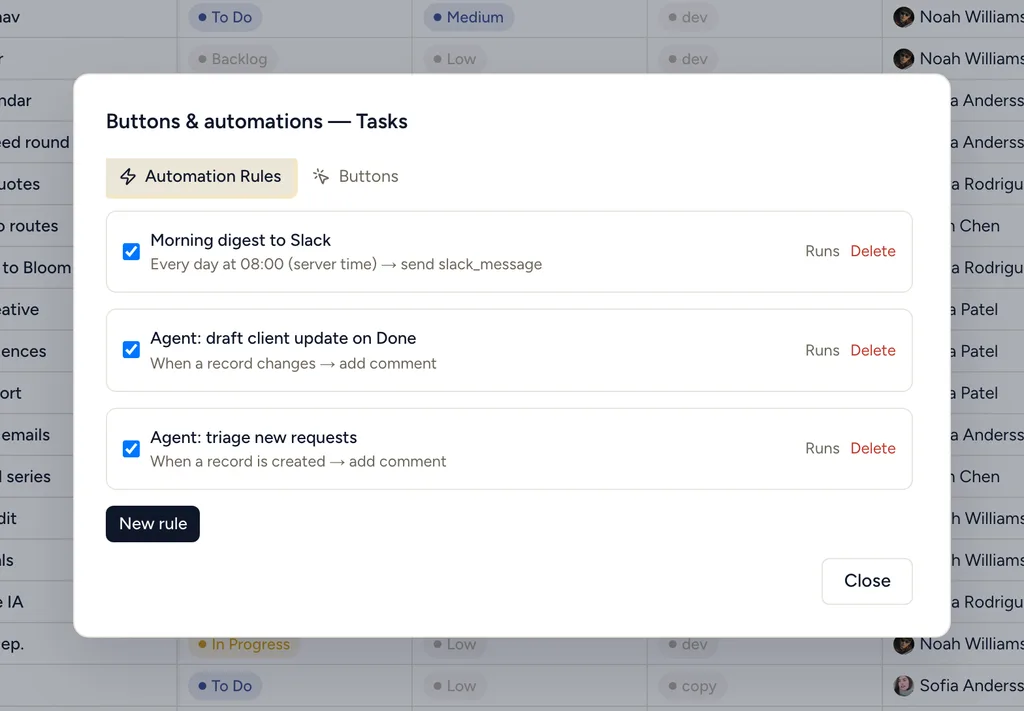
A rule runs it, for example when a new record is created.
-
A schedule
At an interval you set; the shortest is ten minutes.
Agents that come with templates
Ask your AI for it today. The template includes an agent for it.
These agents ship inside Business Packs, in early access. Each runs on your own AI and installs switched off until you turn it on. Today, the way to get the work done is to ask your AI; every draft waits for your yes.
-
Onboarding Assistant
- AskAsk your AI to draft a welcome packet and a first-week checklist on a new client’s record.
- YouYou read it, change what you like, and send it
The Agency OS template includes the Onboarding Assistant for this (early access). agent
-
Draft Assistant
- AskAsk your AI to write an outline on the article.
- YouYou approve the outline before any writing starts
The Content Engine template includes the Draft Assistant for this (early access). agent
-
Follow-up Drafter
- AskAsk your AI to draft a follow-up for the client, on the proposal.
- YouYou decide whether it goes, and when
The Consulting OS template includes the Follow-up Drafter for this (early access). agent
-
Triage
- AskAsk your AI to draft a first response on the new ticket.
- YouYou approve or edit it before the customer sees it
The Support Inbox template includes the Triage for this (early access). agent
-
Approval Drafter
- AskAsk your AI to draft the note asking your client to sign off on a task.
- YouYou check it before it reaches the client
The Client Portal template includes the Approval Drafter for this (early access). agent
-
Session Notes Assistant
- AskAsk your AI to write up the notes on the session you just finished.
- YouYou keep, edit or bin them
The Coaching OS template includes the Session Notes Assistant for this (early access). agent
-
Deal Desk
Deal Coach
- AskAsk your AI to comment on a deal at Proposal: what is missing before it can close, and one next step.
- YouYou decide what to do with it
The Deal Desk template includes the Deal Coach for this (early access). agent
-
Deal Desk
Call Debrief
- AskAsk your AI to turn your call notes into a debrief on the deal: what was agreed, objections, and the next step.
- YouYou keep, edit or bin it
The Deal Desk template includes the Call Debrief for this (early access). agent
-
Deal Desk
Hand-off Writer
- AskAsk your AI to write the hand-off to delivery for a won deal, as a comment on the deal.
- YouYou approve any project it proposes
The Deal Desk template includes the Hand-off Writer for this (early access). agent
Deal Desk’s three agents also install off. More come with the Dev Project OS, Book Launch and other packs. See all templates.
How it works
From a change on a record to a draft on your desk.
StoryOS hands an agent one record. The Runner starts Claude Code on your computer, gives it that one job, and reports back how it went.
- 01
Something happens in your business
A record changes state, someone assigns or mentions the agent, or a rule fires.
- 02
StoryOS hands the job to the Runner
It hands the job to the Runner on your computer: one record, one task.
- 03
Your Claude Code does the work
On your computer, in your own subscription. It reads the record and its links, then drafts.
- 04
The result lands on the record
Every change carries an agent badge in the Activity panel, so you always know what the AI did.
- 05
You decide what goes out
Deletes and outward messages an agent triggers can be held in your Inbox until you approve.
Where it runs
Your computer. Your Claude Code. Your bill.
The agents you hire run on a computer you own, inside the Claude Code subscription you already pay for. Nothing about them is metered by us.
- Your computer
- The Runner is a small program on your own computer. It only makes outbound connections and opens no port.
- Your Claude Code
- It runs agents inside your own Claude Code subscription. Claude Code is the only tool it supports today.
- Never metered
- StoryOS never meters it. You pay for Claude Code directly; we add nothing on top.
- One job at a time
- One run at a time by default, and a run stops at thirty minutes.
- Your computer has to be on
- It must be switched on and signed in to Claude Code. If it sleeps, your agents wait: StoryOS shows the Runner as offline after two minutes, and the work picks up when the computer wakes.


You stay in charge
Agents draft and propose. People decide.
Hiring an agent does not hand it the keys. Its access, its triggers and what leaves your business are all yours to set.
- Off until you switch them on
- Agent triggers and outward automations that come with a template install switched off. You turn them on in the install review.
- Held actions wait for you
- Deletes and outward messages an agent triggers can be held in your Inbox. Only a person approves; the AI cannot approve itself or change the gates.
- A badge on every change
- Whatever an agent changes is marked as the agent’s in the Activity panel, beside your team’s own edits.
Getting it
The Runner is in early access.
Pairing and runs already work in StoryOS. The program for your computer is not yet published for everyone, so we are setting people up one by one.