Trello keeps the cards moving. StoryOS knows who they are for.
Trello makes moving cards a pleasure. In StoryOS, a task also knows its customer, its job and its invoice: your real business lives in one place, connected, and your own AI does the work inside it while you approve what matters.
What Trello is great at
Credit where it’s due.
Simple from the first minute
Boards, lists and cards anyone can pick up. Unlimited cards on every plan, and a free plan for up to 10 collaborators per Workspace.
A huge ecosystem
Power-Ups connect boards to more than 200 apps and tools, such as Slack, Google Drive and Salesforce, with unlimited Power-Ups on every plan.
Automation and apps everywhere
No-code automation is built into every board, and there are iOS, Android and desktop apps on every plan.
Where StoryOS is different
Your business, connected. Your AI crew, at work in it.
If your board has started to float apart from the business, this is the part that changes.
-
01
Your real things, connected
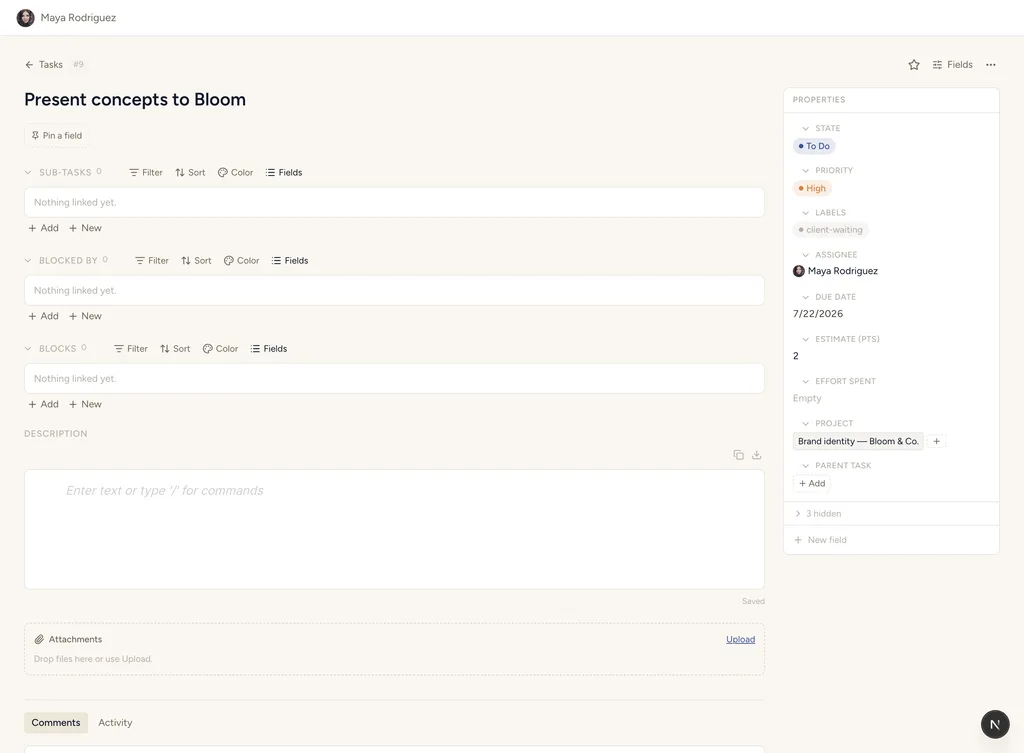
In StoryOS, a task knows its customer, its job and its invoice. Open a customer and see every job, task and unpaid invoice in one place, because they are records that link up, the way they do in real life.
-
02
Your AI crew works inside it
Connect Claude, ChatGPT or any remote-MCP client and ask for the work. It reads your schema before it writes, so it knows what an invoice is here, and every change it makes is badged as the AI’s, under your name.
-
03
You approve what matters
Gate deletes, emails to customers or one agent’s writes. Held actions wait in your Inbox until a person says yes. Your AI cannot approve itself or change the gates.
-
04
The AI you connect is never metered
MCP and the REST API come with every plan, Free included. You pay Claude or ChatGPT directly; on our side, plans count automation runs, not your AI.
-
05
Open source, and yours to take
AGPL-3.0 and self-hostable: the same code we host. An admin can export every record and link whenever they like.
Side by side
StoryOS and Trello, fact by fact.
Prices as of 18 November 2026. Every Trello line is taken from Trello’s own pricing, docs or help pages. Where we could not check something, we left it out.
| Topic | StoryOS | Trello |
|---|---|---|
| How you pay | Per workspace, with editors included (Free 2, Pro 3, Business 5). Extra editors are $12 a month. Guests are always free. | Per user per month on paid plans. Workspace members are billable; a guest on more than one board is billed like a member. |
| Plans | Free $0 · Pro $29 a month · Business $99 a month · Enterprise custom. | Free $0 · Standard $5 per user a month billed annually ($6 monthly) · Premium $10 ($12.50 monthly) · Enterprise $17.50 per user a month, billed annually. |
| Free plan | 2 editors, 100 automation runs a month, no record limit. No history kept on Free (Pro 1 day, Business 7, Enterprise 30). | Up to 10 collaborators per Workspace, unlimited cards, up to 10 boards per Workspace, 250 Workspace command runs a month. |
| Automation | Automation runs a month: 100 on Free, 1,000 on Pro, 10,000 on Business, unlimited on Enterprise. | Built into every board. Workspace command runs a month: 250 on Free, 1,000 on Standard, unlimited on Premium and Enterprise. |
| AI | Connect your own Claude, ChatGPT or any remote-MCP client. MCP and REST API on every plan. The AI you connect is never metered. | Trello’s AI features (summaries, AI organization, AI-generated boards, AI quick capture) come with Standard and above. |
| Data export | An admin exports every record and link in the workspace. | Every board member can export a board as JSON. CSV export, and exporting all boards in a Workspace, come with Premium. |
| Hosting | Our cloud, or your own server: AGPL-3.0, self-hostable. | In Trello’s own words, “proudly a cloud-only product”. |
Trello facts read on 18 November 2026. Prices in USD; check the vendor’s page before you decide. Read from trello.com/pricing, Trello’s export help. Prices change; check each vendor’s page before you decide.
Moving over
From Trello to StoryOS.
StoryOS imports CSV files. Start with one list, such as your customers or open jobs, and bring the rest when you are ready.
What Trello exports
All board members can export a board as JSON. CSV export comes with Trello Premium, where a Workspace admin can also export every board at once, in CSV and JSON.
-
01
Export each board from the board menu (Print, Export, and Share). CSV needs Trello Premium; on Free and Standard you get JSON, which you would need to convert to CSV first.
-
02
In StoryOS, import each CSV. It suggests a field type for every column; you confirm the mapping and see a dry run before anything is written.
-
03
Map a column such as Customer to a relation, and each row links to the customer record with that name.
-
04
Then connect your AI and ask for the tidy-up: “link every task to its job”, “which jobs have no invoice yet?”.
Also comparing: StoryOS and Notion · StoryOS and Airtable · StoryOS and Fibery
You run the business. Your AI crew does the work.
Priced per workspace with editors included; extra editors $12. Guests are always free, and the AI you connect is never metered.