Run a one-person business like it has an assistant.
Freelancers, consultants and tradespeople: your customers, quotes, jobs and visits in one place. You do the work only you can do; ask your AI for the follow-ups, the notes and the reminders.
Customers Quotes Jobs Visits Invoices , linked.

A week
A week for one person and their customers.
The same few things carry the whole business, so the quote, the job it became and the invoice at the end are never three separate lists.
- 01
Monday: quotes, with real money on them
Draft, Sent, Negotiating, Won. A bookkeeper sees every quote with its value, its date and the customer, so next month’s money is a board to read.
agent Ask your AI to draft the follow-up on a proposal from what the record already knows: scope, value, who you last spoke to. The Consulting OS template includes a Follow-up Drafter for this (early access).
- 02
Tuesday: running jobs and their hours
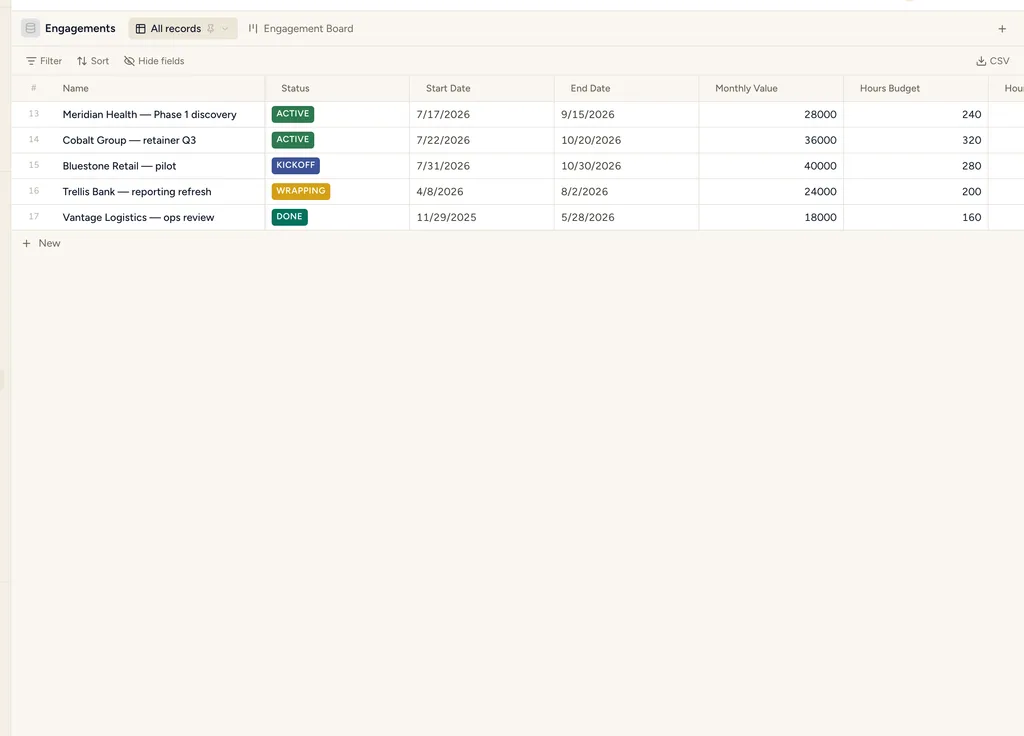
Won quotes become jobs with a start, an end, a monthly value and an hours budget, so you see a job running over before you invoice it, not after.
Ask your AI to tell me which jobs are close to their hours budget.
Swipe to see the whole view - 03
Wednesday: visits on the calendar
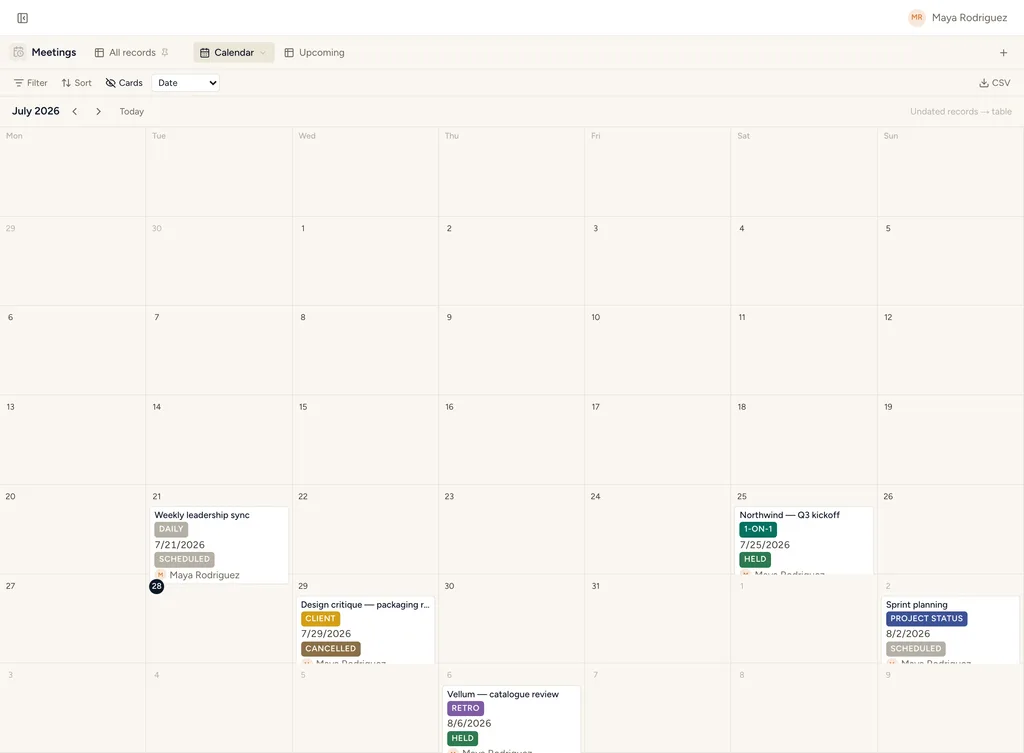
A plumber’s month: site visits, quote visits and the team catch-up, each on its day, by month, week or day.
Ask your AI to turn these site-visit notes into tasks with dates.
Swipe to see the whole view - 04
Thursday: clients and their sessions
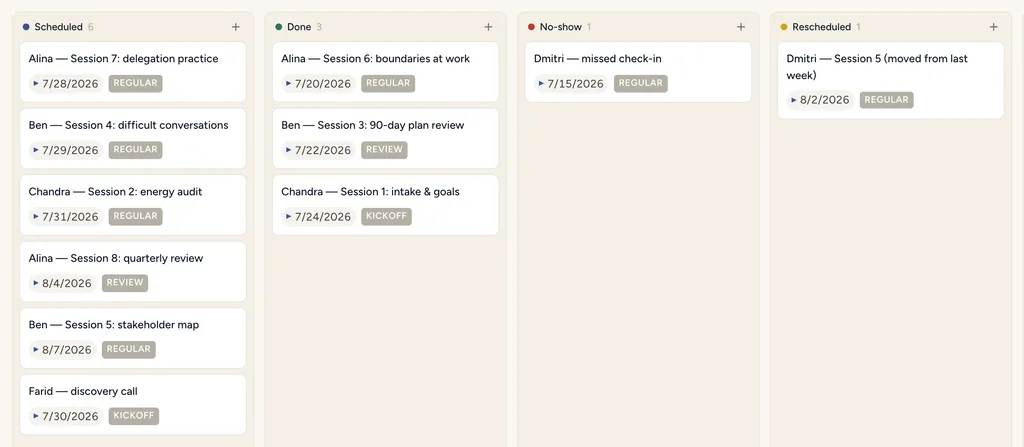
Coaching or client work runs on its own board: scheduled, done, no-show, rescheduled. Each session links to its client, so the history is one click away before the next call.
agent Ask your AI to draft the notes for the session you just finished and turn the action items into records with owners. The Coaching OS template includes a Session Notes Assistant for this (early access).
- 05
Friday: who still owes you
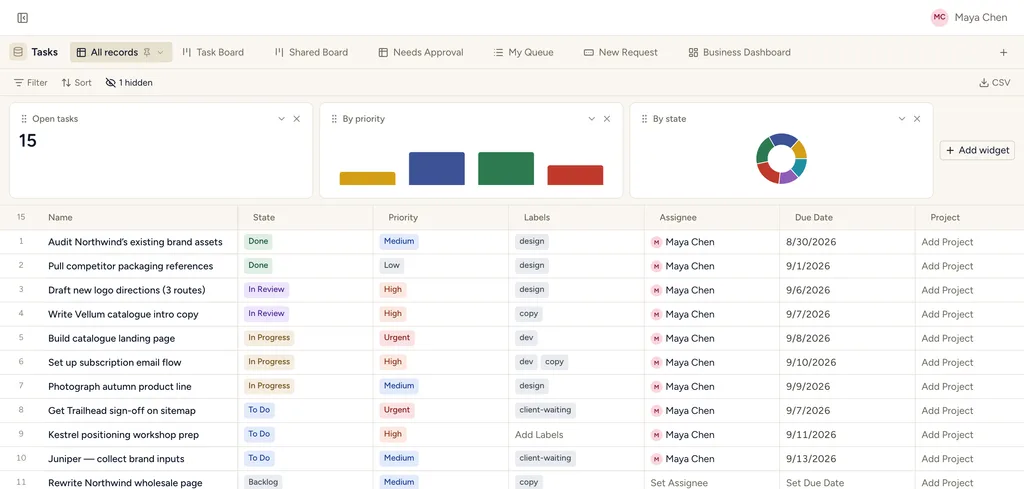
Unpaid invoices with the total waiting right above the list, counted from the same records. No spreadsheet, no guessing.
Ask your AI to list the unpaid invoices and draft a short reminder for each.
Swipe to see the whole view
Your own AI
Ask your own AI to…
Connect Claude or ChatGPT and treat it like the assistant you have not hired yet. It works on the same customers, quotes and jobs you do.
It connects over MCP and reads how your business is laid out before it changes anything. Its changes are badged as the AI’s, under your name, and an admin can require a person’s approval before any AI deletes a record. It runs on the subscription you already have; we never meter it. How StoryOS works with AI
agent Hired agents are early access and run on your own computer, in your own Claude Code. Agents that come with a template install switched off. Today, the way to get work done is to ask your AI; every draft waits for your yes.
- …tell me which quotes have had no reply in a week, and draft a nudge for each.
- …turn today’s session notes into action items for the client.
- …add up what I invoiced this month, customer by customer.
- …tell me what is booked next week and where I have a free day.
Templates
Start from a template for your business.
Start with the part that eats your evenings, and add the rest when you need it.
-
Business Pack
Consulting OS
Clients, proposals, engagements and deliverables, from the first quote to the last piece of work, with the Follow-up Drafter.
-
Business Pack
Coaching OS
Clients, programs, sessions and action items, already linked, with the Session Notes Assistant.
-
Template
Meetings & Action Items
Visits and meetings on a calendar, with the notes and the action items that come out of them.
-
Template
Sales CRM
Customers, deals and follow-up tasks, with a pipeline and a closing-this-month list.
Run the whole business from one place.
Start from a template for your kind of work. Add the rest when you need it.