Every enquiry, deal and post tied to a real customer.
StoryOS is the one place a small business’s real things live (customers, jobs, orders, invoices): for a shop, studio or service business of a few people, it ties every enquiry, deal and post to a real customer, and your own AI works inside it. Ask your AI who needs a follow-up and what ships this week.
Customers Enquiries Deals Posts Tasks , linked.
A week
A week in a business of a few people.
A lead, its quote and the work that follows are linked to the customer, so nobody has to remember who said what to whom.
- 01
Monday: the enquiry arrives in their own words
A cake shop opening in January asks what a simple website would cost. The form drops it in as a new enquiry, with the business and the need filled in and the newest at the top.
- 02
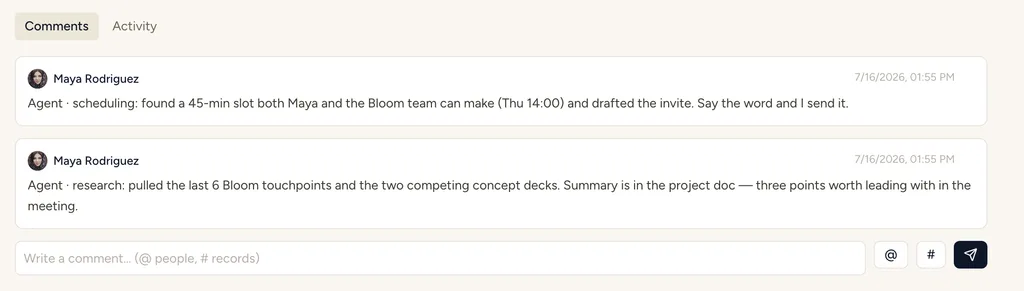
Monday, later: your AI drafts the reply
Ask your AI to answer it. It reads the business, the need and the budget, prices it from similar work and writes the reply on the record, badged as the AI’s. Nothing goes to the customer until you read it and send it.
Ask your AI to answer the new enquiry, priced from what we charged for similar work.
Swipe to see the whole view - 03
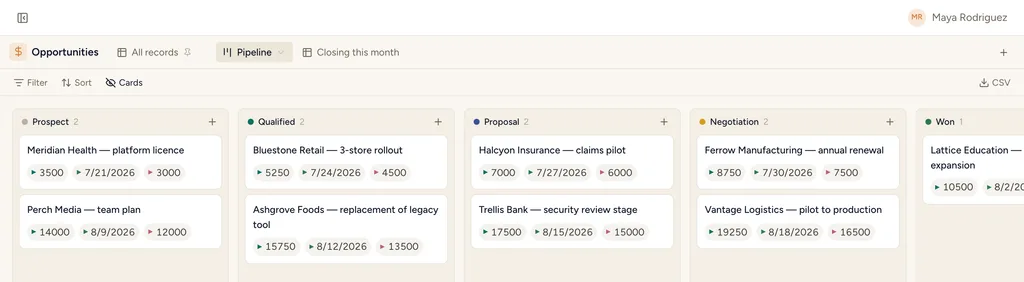
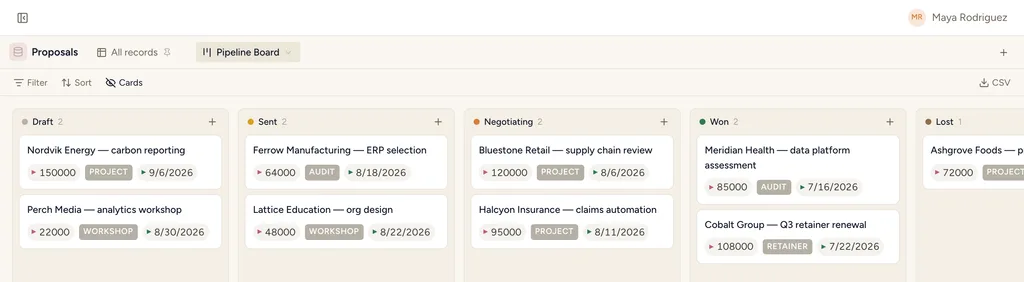
Tuesday: every deal has an owner and a next step
New, Quoted, Won, Not now. Each card carries the business, what they need, the budget and who owns it. A deal with no owner or no next step stands out, because the column shows it.
Ask your AI to tell me who needs a follow-up, and draft each one for me to send.
- 04
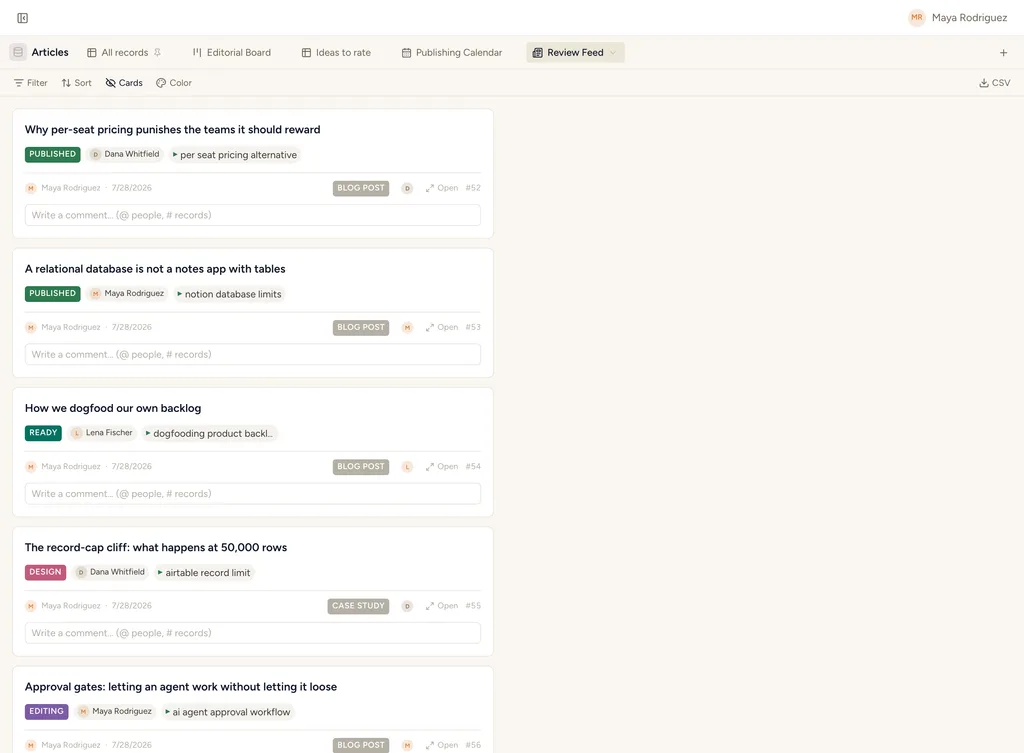
Wednesday: posts on one pipeline
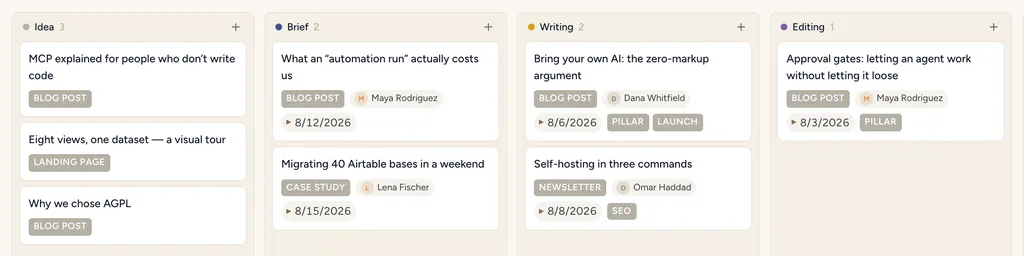
The newsletter and the how-to posts that bring customers in move from Idea to Brief to Writing to Editing, each with its owner and date.
- 05
Friday: this week, in one list
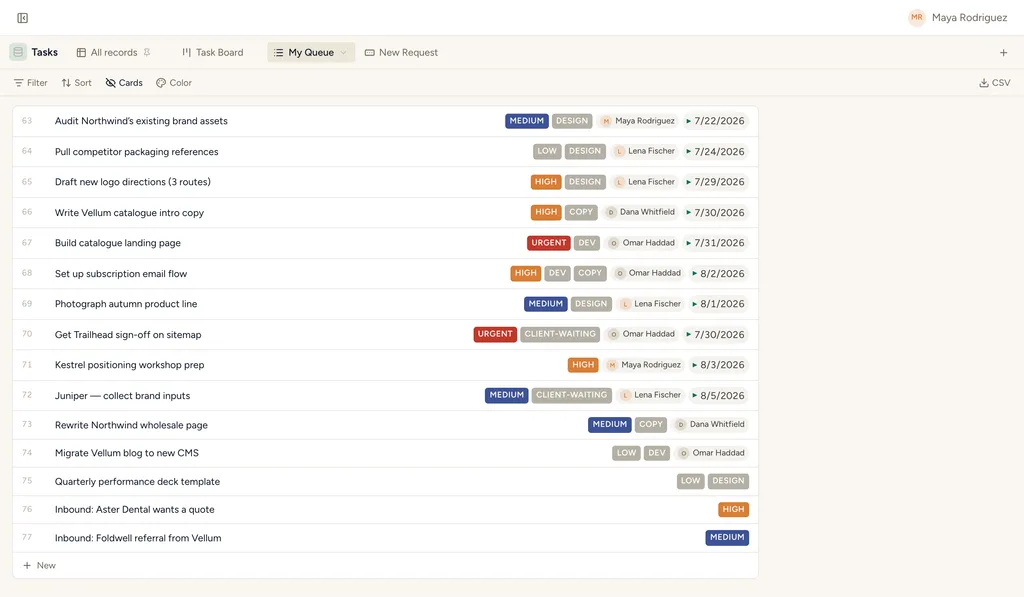
What is due this week, with who is on it and its status, including what is waiting on a customer. That is the status meeting, without the meeting.
Ask your AI to tell me what ships this week and what is stuck.
Swipe to see the whole view
The short version
StoryOS for small businesses, in plain facts.
- Who it is for
- The owner of a shop, a studio or a service business with a few people: someone who answers enquiries, sends quotes and posts to bring customers in, and either has no task system or has a board that has drifted apart from the customers it is about. If a card cannot tell you which customer it is for, which job it belongs to or which invoice it is waiting on, this is the gap StoryOS fills.
- What it installs
- You start from a template or a Business Pack, not a blank page. The Sales CRM template installs accounts, contacts, opportunities and sales tasks, already linked, with a pipeline view and sample records. The Content Engine pack adds articles, topics and campaigns with an editorial board, and Support Inbox puts every customer question on one board. Rename every stage and field to the words your business uses.
- What it costs
- StoryOS is priced per workspace: Free is $0 with 2 editors included, Pro is $29 a month with 3, Business is $99 a month with 5, and each extra editor is $12 a month. Viewers and guests are always free, at any access level, and records are unlimited on every plan. Connecting your own Claude or ChatGPT is never metered. The full table is on pricing.
- What it does not do
- It is not accounting software: an invoice in StoryOS is a record you track (the amount, the due date, paid or not), and StoryOS does not file taxes or move money. Your AI does not run the business on its own either: it works when you ask, and you can make anything it sends outside the business wait in your Inbox for a person’s yes. Agents that come with a Business Pack install switched off; the Runner that runs them on your own computer is in early access.
- How your AI gets in
- Connect Claude or ChatGPT over MCP in three steps; the API and MCP come with every plan, Free included. Your AI reads how the business is laid out before it writes, every change it makes carries an AI badge, and it never has more access than the person who connected it. Connect your AI.
Your own AI
Ask your own AI to…
Connect Claude or ChatGPT and ask about the business in plain words. It answers from today’s records, and anything that leaves the building waits for your OK.
It connects over MCP and reads how your business is laid out before it changes anything. Its changes are badged as the AI’s, under your name, and an admin can require a person’s approval before any AI deletes a record. It runs on the subscription you already have; we never meter it. How StoryOS works with AI
- …list every quote with no reply in a week.
- …log these call notes on the right customer and set the next step.
- …tell me which customers came back for a second job this year.
- …draft next month’s newsletter outline from the posts that brought in enquiries.
Templates
Start from a template for your business.
Pick the part of the business that hurts most. Each one installs already linked; rename the stages to your own.
-
Template
Sales CRM
Accounts, contacts, deals and follow-up tasks, already linked, with a pipeline and a closing-this-month list.
-
Template
Campaigns HQ
Campaigns with their budget, channels and brief, plus the audiences, results and tasks behind them.
-
Business Pack
Content Engine
Articles, topics and campaigns, already linked, with an editorial board and the Draft Assistant.
-
Business Pack
Support Inbox
Customer questions on one board, so nothing gets two replies or none, with a Triage agent.
FAQ
Questions small businesses ask
What is StoryOS for a small business?
StoryOS is the one place a small business’s real things live: customers, enquiries, deals, jobs, posts and invoices, as records that link to each other. A shop, studio or service business of a few people runs its week there, and connects its own Claude or ChatGPT to answer, draft and update records when the owner asks.
How much does StoryOS cost for a small business?
It is priced per workspace. Free is $0 with 2 editors included, Pro is $29 a month with 3 editors, Business is $99 a month with 5 editors, and each extra editor is $12 a month. Viewers and guests are always free, at any access level, and records are unlimited on every plan.
Do I need to know about databases to set it up?
No. Start from a template such as Sales CRM or a Business Pack such as Support Inbox. Each one installs its databases already linked, with saved views and sample records, and you rename the stages and fields to your own words.
Does the AI work on its own?
No. Your AI works when you ask it, in plain words, and every change it makes is badged as the AI’s. An admin can require approval for deletes by any AI and for a hired agent’s writes; edits a connected assistant makes are not held. Agents that come with a Business Pack are early access and install switched off; they run on your own computer through the StoryOS Runner.
Can a customer or a freelancer see our work without paying for a seat?
Yes. Viewers and guests are always free, at any access level, so you can share a space with a customer or bring in a freelancer without paying for them.
Can I leave and take my data with me?
Yes. A workspace admin can export the whole workspace, every row and every link, on every plan. Cancelling a paid plan moves the workspace to Free and deletes nothing. StoryOS is also open source under AGPL-3.0, so you can run it on your own server instead.
Run the business where the work happens.
Start from a pipeline that is already linked to your customers.